Downloading and saving your code
Run
cs1010, selectDownload CS1010 content, then choose Labs and Lab 1 to download the starter code. This lab is not graded; the supplied tests are for self-checking. You can still chooseSubmit/save current workincs1010if you would like to save your code on GitHub.
Preface
We’re going to get some hands-on practice reading and writing functions. We’ll start by examining common function prototypes. This won’t cover everything there is to know about functions in C, but it will introduce the most common forms.
Then, we’ll practise using if-else statements and conditionals.
Activity 1
int foo(char, int);

void bar(void) {
	foo('a', 5);
	qux(5);
}

int qux(int x) {
	return x + 5;
}

int foo(char ch, int s) {
	return s - ch;
}

int main(void) {

}
Refer to the snippet above for the following parts. Do them without compiling the code first.
Part 1
Which functions, if any, have not been declared before they are called? Which calls will cause compilation issues?
Part 2
Based on your answers to the previous part, what changes would resolve those errors?
Part 3
Compile the original code and inspect the errors that appear. Then make your proposed changes, compile the code again, and verify that your changes fixed those errors.
Activity 2
char foo(char c) {
	return c;
}

void bar(int c);

int main(void) {
	foo(20); // Line A
	foo(1000); // Line B
	bar('a'); // Line C
	return 0;
}
Part 1
Before compiling, predict what will happen at Lines A, B, and C. Which lines, if any, will produce compiler errors or warnings? Will the complete program build successfully?
Part 2
Compile the code and compare the result with your predictions. Did you miss anything?
Activity 3
An important part of writing if-else statements is dividing a problem into cases
and ensuring that every possible case is handled.
Let’s get some practice doing that.
Part 1
#include <stdio.h>

void print_sign(int x) {
	if (x > 0) {
		printf("%d is positive\n", x);
	} else {
		printf("%d is negative\n", x);
	}
}
What’s wrong with the above code? Assume that we do not wish to change the existing printf statements. How should you fix it?
Activity 4
Simplify the following code by removing redundant conditions. The behaviour should remain exactly the same. Pay attention to whether a logical operator is still necessary after you simplify the conditions.
void bar(void);
void corge(void);
void grault(void);

void foo(int x) {
	if (x == 5) {
		bar();
	} else if (x < 3) {
		corge();
	} else if (x > 4) {
		bar();
	} else {
		corge();
	}
	grault();
}
Problem Solving Practice 1
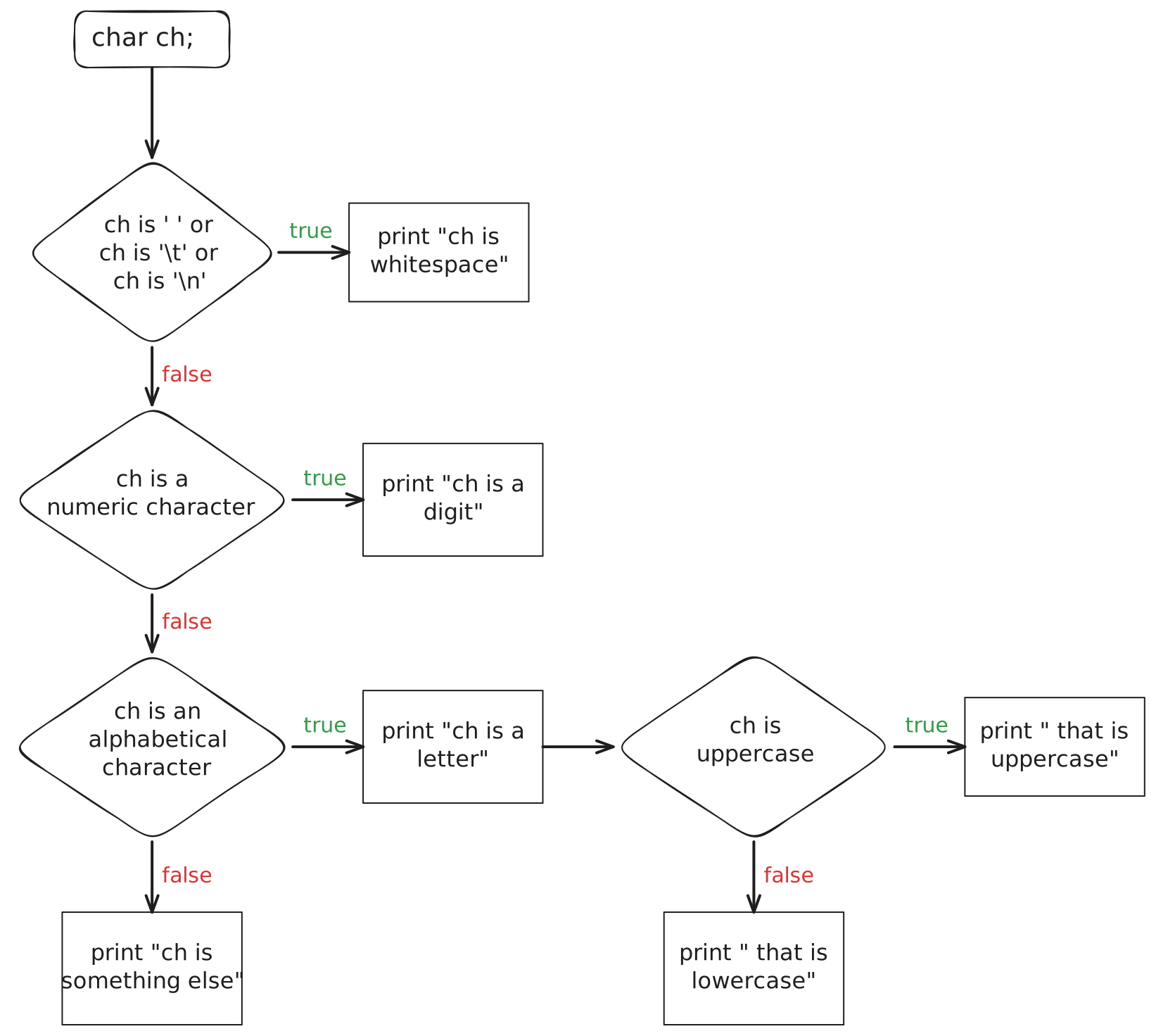
Implement the behaviour shown in the flowchart above.
The starter code for this activity is in problem-solving-1/main.c.
Implement the following function:
void print_character_classification(char ch);The provided main function reads the character and calls your function.
Do not modify main.
Focus on your function
The provided
mainuses some C concepts that have not been covered in CS1010 yet. You do not need to understand or change that code for this activity. Focus only on implementingprint_character_classification.
Use the following cases to check that your program follows the paths shown in the flowchart:
| Input Character | Output |
|---|---|
| space | ch is whitespace |
7 | ch is a digit |
A | ch is a letter that is uppercase |
q | ch is a letter that is lowercase |
# | ch is something else |
All outputs should end with a newline (\n).
Test your program with more cases of your own, and use the flowchart to predict which path each character should follow.
Problem Solving Practice 2
A robot is travelling through a corridor and should remain halfway between its two walls. It has one distance sensor facing each wall.
Every reading is an integer distance in centimetres. Each sensor is reliable from 5 cm to 200 cm, including both endpoints.
Apply these rules in order:
- If either reading is outside the reliable range, stop
- If either wall is less than 10 cm away, stop
- If the two distances differ by no more than 4 cm, continue forwards
- Otherwise, if the left wall is closer, turn right
- Otherwise, if the right wall is closer, turn left
Hint
You may find the
absfunction (tryman 3 abs) helpful
The robot represents its movement using one character:
| Character | Movement |
|---|---|
F | Continue forwards |
L | Turn left |
R | Turn right |
S | Stop |
Part 1
Before writing any code, draw a flowchart that describes how the robot decides what to do. Your flowchart should begin with the two sensor readings and end with exactly one of the four movement characters.
Check that every possible set of readings follows one path to a movement. Compare your flowchart with a partner’s and discuss any differences before continuing.
Part 2
Implement the following function:
char decide_movement(int left_distance, int right_distance);The starter code is in problem-solving-2/main.c.
The provided main function safely reads the left and right sensor values in the order
shown in the function prototype and prints the movement character returned by your function.
Do not modify main.
Include
-std=c23during your compilationWhen you compile your code for this part, please include the flag
-std=c23in your clang options e.g.,clang -std=c23 main.cfor example. Otherwise, the compiler will ask you to includestdbool.hif you use booleans anywhere, which is not required from C23 onwards.
Focus on your function
The provided
mainuses some C concepts that have not been covered in CS1010 yet. You do not need to understand or change that code for this activity. Focus only on implementingdecide_movement.
Hint
Can you write any functions to help you reduce duplication in your code?
Use the following cases to check your reasoning:
| Left Distance | Right Distance | Movement |
|---|---|---|
| 20 | 23 | F |
| 8 | 8 | S |
| 30 | 35 | R |
| 30 | 20 | L |
| 4 | 30 | S |
Test your function with more cases of your own, especially readings at the smallest and largest reliable values.