Run cs1010, select Download CS1010 content, then choose Labs and Lab 2
to download the starter code.
This lab is not graded; the supplied tests are for self-checking.
You can still choose Submit/save current work in cs1010 if you would like
to save your code on GitHub.
Include -std=c23 during your compilation
When you compile your code for this lab, please include the flag -std=c23
in your Clang options, for example, clang -std=c23 main.c.
Otherwise, the compiler will ask you to include stdbool.h if you use
booleans anywhere, which is not required from C23 onwards.
Preface
In Lab 2, we’re slowly building up to bigger and bigger programs (especially with more language features). So this lab:
We will tie up conditionals with a few other mechanics that you’ll need to know. We will do this via experimentation for you again.
We’ll start getting you to try to apply both behavioral and data abstraction by first cleaning up code that we’ll provide.
And then, a little more problem-solving practice as usual.
Note
One thing Sriram and Eldon have noticed over the years is the fixation that students have on answers instead of the method of being able to survive and seek your own answers. Very commonly students wonder:
What is the correct answer?
Why is it the correct answer?
If it comes out in exam, how am I ever going to get full marks?
While these are fine and all when working in a closed system like a university course, ideally, we would like the labs to be a time that is spent focusing instead on:
How do I test this program behaviour?
What should my approach be to solving problems in general?
How can I figure out the answer on my own? (To any problem, not just the ones in exams.)
Exam questions are really just meant as a stick to push students to even try solving questions in the first place. But don’t lose sight of the goal, you need to be independent solvers at some point, we’re just trying to make sure the lab is an environment that allows for it to happen.
Experiment freely! Labs are meant to be a place where programs can crash. Programs bug out and fail. Often ask yourself why it happened, what kind of bugs lead to it, and how you should avoid it. Randomly coding and guessing what lines should be is like throwing spaghetti at the wall. Even if the code compiles and “works”, you didn’t really accomplish mastery, you just fulfilled a task without any knowledge gain.
Think of it like a JRPG. You’re just levelling your character up right now. CS1010 is your character level-up arc. (Nodle)
Activity 1: Short-Circuiting in Conditionals
We’re going to start by getting you to divine some behaviour from a few snippets of code. The code might/might not line up with your expectations. Try to figure out what is going on.
In part-1.c:
#include <stdbool.h>#include <stdio.h>bool foo(){ printf("foo called returning true\n"); return true;}bool bar(){ printf("bar called returning false\n"); return false;}int main(){ if(foo() && bar()){ printf("line A reached\n"); } printf("BOOP\n"); if(foo() || bar()){ printf("line B reached\n"); }}
Part 1
Before you compile and run the code, make a prediction on the exact output you should see on the screen. Take some time to trace it out line by line if needed, then run it and compare it against your predictions. Was it any different?
Hint: Most likely, you predicted more lines than there would be. Which lines were missing? Why do you think they were missing? Can you try to figure that out based on the return values and the logical operators being used?
Hint 2: What’s the name of this activity? (That’s the actual name of the mechanic.)
Part 2
In part-2.c:
#include <stdbool.h>#include <stdio.h>bool foo(){ printf("foo called returning true\n"); return true;}bool bar(){ printf("bar called returning false\n"); return false;}int main(){ if(bar() && foo()){ printf("line C reached\n"); } printf("BOOP\n"); if(bar() || foo()){ printf("line D reached\n"); }}
What about if we had swapped the function calls around? Based on your understanding of part 1, try to now predict the behaviour again.
Activity 2: Missing Braces
In braces.c:
#include <stdio.h>#include <ctype.h>int main(){ char ch = getchar(); // reads a character from input if(isdigit(ch)) printf("is a digit\n"); printf("is this line printed?"); return 0;}
Before you compile and run the code, make a prediction on the exact output you should see on the screen. Take some time to trace it out line by line if needed. Does it even compile?
Compile, run the program, then enter a character and press the return/enter key. Does the program behave as expected? What happens if you enter a digit? What happens if you enter a non-digit?
Note: This happens to be a pretty big gotcha in a lot of C code out there.
Activity 3: Functions
Now let’s look at some code snippets that would benefit from us making some functions.
Part 1
In clamp.c:
#include <stdio.h>#include "input.h"int main() { int score1 = read_int(); if (score1 < 0) { score1 = 0; } else if (score1 > 100) { score1 = 100; } int score2 = read_int(); if (score2 < 0) { score2 = 0; } else if (score2 > 100) { score2 = 100; } int score3 = read_int(); if (score3 < 0) { score3 = 0; } else if (score3 > 100) { score3 = 100; } printf("%d %d %d\n", score1, score2, score3); return 0;}
Refactor the code with the use of some functions.
Part 2
In point.c:
#include "input.h"#include <stdbool.h>#include <stdio.h>typedef struct { int x; int y;} Point;int main() { Point p; p.x = read_int(); p.y = read_int(); Point q; q.x = read_int(); q.y = read_int(); int dx = q.x - p.x; int dy = q.y - p.y; bool moving_right = dx > 0; bool moving_up = dy > 0; bool on_same_x = dx == 0; bool on_same_y = dy == 0; if (on_same_x && on_same_y) { printf("same point\n"); } else if (on_same_x) { printf("vertical movement\n"); } else if (on_same_y) { printf("horizontal movement\n"); } else if (moving_right && moving_up) { printf("northeast\n"); } else if (!moving_right && moving_up) { printf("northwest\n"); } else if (moving_right && !moving_up) { printf("southeast\n"); } else { printf("southwest\n"); } return 0;}
Refactor the code with the use of some functions.
Activity 4: Structs
Now let’s look at some code snippets that would benefit from us making some structs.
For each of the examples below, try to create a useful struct abstraction.
Part 1
In colour.c
#include <stdio.h>#include "input.h"int main() { int r = read_int(); int g = read_int(); int b = read_int(); if (r < 0 || r > 255 || g < 0 || g > 255 || b < 0 || b > 255) { printf("invalid color\n"); } else if (r == g && g == b) { printf("grayscale\n"); } else if (r > g && r > b) { printf("red dominant\n"); } else if (g > r && g > b) { printf("green dominant\n"); } else { printf("blue dominant\n"); } return 0;}
Note
There’s also a small logical bug in the program related to dominant colors.
Can you spot it?
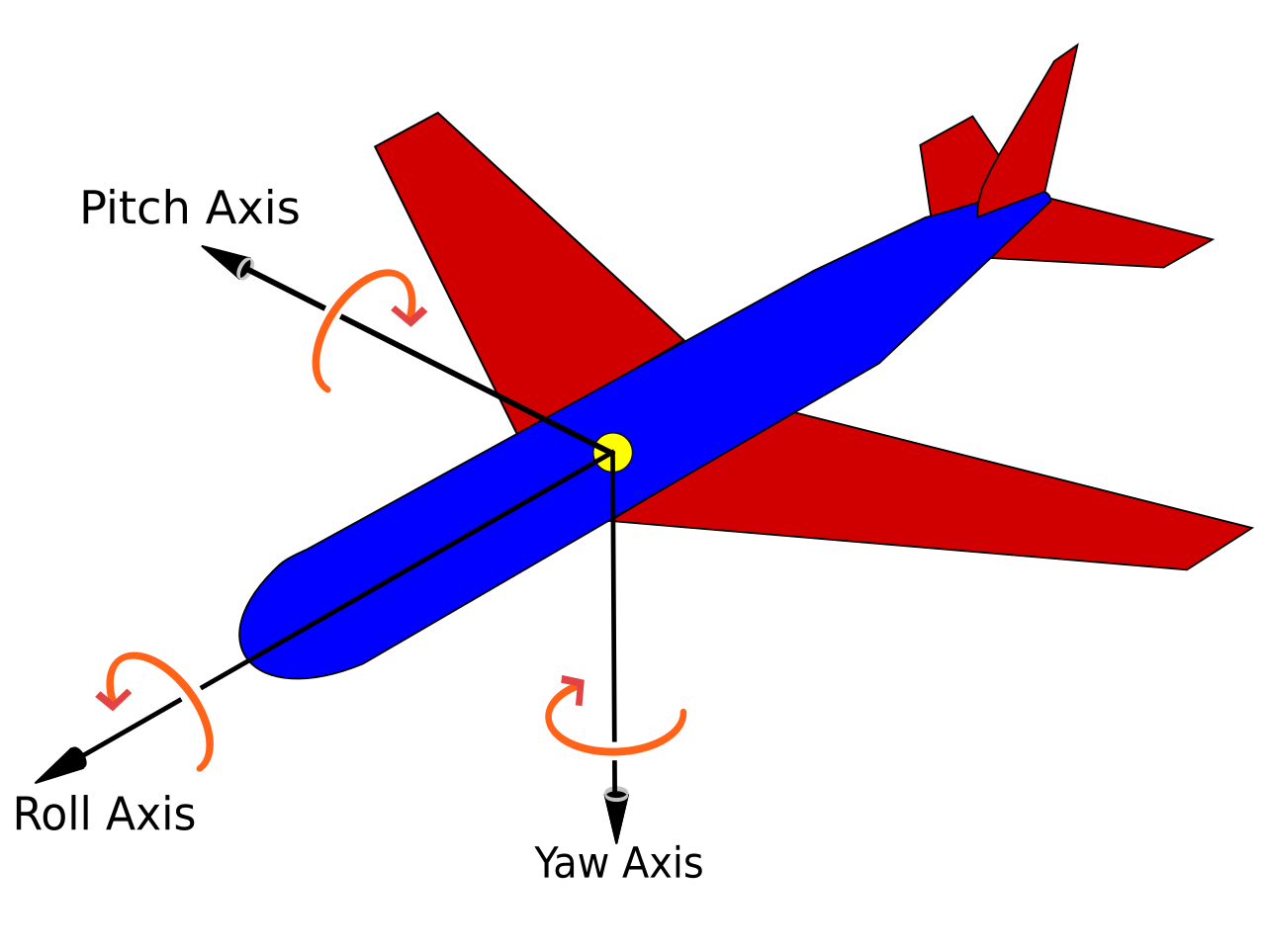
Euler angles are convenient for us to understand.
Flight-control software, however, often stores the same attitude as a
quaternion.
A quaternion has four components: w, x, y, and z.
Imagine that an aircraft’s flight controller stores its attitude as a
quaternion,
while its ground station displays roll, pitch, and yaw to the operator.
The two programs need to convert the same attitude in both directions.
The starter code in problem-solving-1/ provides these types:
All angles in this exercise are in radians.
You do not need to derive the conversion formulae,
but you will need to translate them carefully into C.
The inverse-conversion formula below assumes that the input quaternion is
normalized, meaning that w*w + x*x + y*y + z*z is 1 (up to floating-point
rounding). The supplied quaternion test cases are normalized.
To convert roll, pitch, and yaw into a quaternion,
first use the following abbreviations:
The subscripts tell you which angle each value belongs to.
For example,
cr is the cosine of half the roll angle,
while sy is the sine of half the yaw angle.
Use those values to calculate the four quaternion components:
Before calculating pitch,
clamp s to the range from −1 to 1.
This means replacing a value below −1 with −1,
replacing a value above 1 with 1,
and otherwise leaving it unchanged.
This prevents small floating-point rounding errors from giving asin
an input outside its valid range.
In C,
the inverse sine function is called asin,
and the two-argument arctangent function is called atan2.
Both are declared in the <math.h> header file.
For euler, it prints w, x, y, and z in that order.
For quaternion, it prints roll, pitch, and yaw in that order.
Each value is printed to five decimal places. For example:
euler 0 0 0
produces:
1.00000 0.00000 0.00000 0.00000
Run make test to test both conversion functions using the paired input and
output files in test/test_cases/. Inspect those cases, and add your own if
you want to check more attitudes.
Problem Solving Practice 2: Orienting a QR Code
The previous activities used functions and structs mostly separately.
Now we will combine them in an interesting (and genuinely real-world way): fixing a QR code’s orientation.
We are going to represent a QR code with a struct, and you will determine its orientation using conditionals, and put together (compose) image-related functions to orient it correctly.
An upright QR code has large finder patterns in its top-left, top-right,
and bottom-left corners.
The bottom-right corner is the only corner without a finder pattern.
Each test image is a valid QR code rotated by 0, 90, 180, or 270 degrees.
For example, the QR code below has been rotated twice, and to read it correctly, it must be oriented such that the finder patterns are in the top-left, top-right, and bottom-left corners.
The starter code for this activity is in problem-solving-2/.
It provides this type:
typedef struct { image_t image;} QRCode;
You do not need to know how image_t represents an image (yay abstraction!).
You will work with the complete QR code through the QRCode struct
and the following supplied functions:
The rotation function changes the represented image in place by one clockwise
quarter-turn.
We will use one character to describe the direction in which the top of the
original QR code currently points:
Character
Current Orientation
Corner Without a Finder Pattern
U
Upright
Bottom-right
R
90 degrees clockwise from upright
Bottom-left
D
180 degrees from upright
Top-left
L
90 degrees anticlockwise from upright
Top-right
Part 1 Plan the Cases
Before writing code, draw a table with these three columns:
corner without a finder pattern, orientation character,
and number of clockwise quarter-turns needed to become upright.
Fill in all four possible orientations.
Check that each possible missing corner appears exactly once.
Part 2 Determine the Current Orientation
Implement the following function:
char current_orientation(QRCode qr);
Use the supplied finder-pattern functions to check the corners of qr.image.
Return the corresponding character from the table above.
This function should only determine the current orientation.
It should not rotate the image or print anything.
Part 3: Orient the QR Code
Implement the following function:
void orient_qr(QRCode qr);
Call the function you implemented (current_orientation) once,
then use the result and your table from Part 1 to decide what to do.
Use only the supplied rotate_90_clockwise function (you may add more abstraction if you want) so that the final image is upright.
Part 4: Test the Result
The exercise includes four input images in the same directory as
the C files:
qr-upright.bmp
qr-90-clockwise.bmp
qr-180.bmp
qr-90-anticlockwise.bmp
Compile the program, pass it an input filename and a different output filename,
then open the result with feh. For example: