Note
Goals
This exercise will try to give you a little more hands-on practice with the foundations behind pointers. Hopefully this is basic enough.
By the end of this, you should have:
- At least gone through the syntax for pointers
- Explored a few ideas behind addresses, arrays, strings, and pointers
- Used pointers to change integers, structs, and another pointer through functions
Note
Prerequisites
- Gone through Lecture 5: Pointers and Strings
- You know how to declare and define regular variables like integers, doubles.. and so on
- You know how to print the values of regular variables like integers (using %d)… and so on
This part can be done after Lecture 5. Part 2 will be available after Lecture 6 on dynamic memory allocation.
Contents
- Introduction
- Where We Conceptually Begin: Addresses
- The Syntax in C for Pointers, and Pointer Types
- Pointers vs Arrays, Sizes, and Array Decay
- Pointer Types
- Pointers to Structs
- Pointers to Pointers
Introduction
In this exercise, you’ll see quite a few small programs, each with an example, and with a very small snippet you’ll need to write in order to get the concept. You can edit and run each one right here in the page. We’ll try to get this to explain the basics behind pointers, with you writing a little bit in each program to get it working. We’d recommend doing the sections according to how we’ve laid them out here.
Click Edit to write your code, Run to see what happens, and Reset to start again. The first run needs to load the compiler, so it may take a little longer. The addresses and sizes you see here may differ from WebTop; compare the relationships, rather than expecting the same numbers.
The goal of this extra set is hopefully to give you a little more hands-on experience playing with pointers in C.
Where We Conceptually Begin: Addresses
So we’ve mentioned this before but when writing programs, there’s sort of 2 core components that we care about: the CPU which does the actual computing, and the computer memory (some of you might be thinking of RAM, though this is not necessarily the case).
We’ve also mentioned that you can think of computer memory as really just a sequence of bytes. This means whatever the CPU wants to operate on, it first has to say something like “Let us load the byte, and the byte, and perform some computation, and store that as the byte.”
Here’s a starting and simple analogy, let’s say we lived in a HDB block where each floor only has 1 person (oddly luxurious, we know). Each person here represents 1 byte of data. If say we wanted to compute something about the 5th and 7th person, we need to go to the 5th floor, and the 7th floor. Those are addresses. Similarly, you can think of as an address value. When we’re going to the byte, we’re just accessing address value .

Note
The numbered addresses and byte-sized boxes here are a simplified model, not C code to copy. Recall that a read or write through a pointer accesses an object of the pointed-to type, which may occupy several bytes.
So far in C, we’ve been able to store integers, floating-point values, truthy values (booleans), characters, and so on. Why can’t we also store addresses? So for now let’s not think about why (that comes later), what can we do with such a variable?
In particular, very much like how an integer int x = 5; holds value , we could have a variable pointer ptr = 16 that just represents address 16. Using the HDB analogy, this is just saying the 16th floor of the block.
In a nutshell, now our program can also access bytes at different addresses. In our C program, we can use ptr to do things like:
- Go to whatever address that the value of
ptrhappens to be, read it - Go to whatever address that the value of
ptrhappens to be, write something to it
So for example, if the value of ptr is 16, and we want to use the pointer with this value,
we’d be doing something (reading or writing) to the 16th byte of our computer memory.
Take a moment to digest this: We’re using ptr to go to a specific place in computer memory, to change something about it.
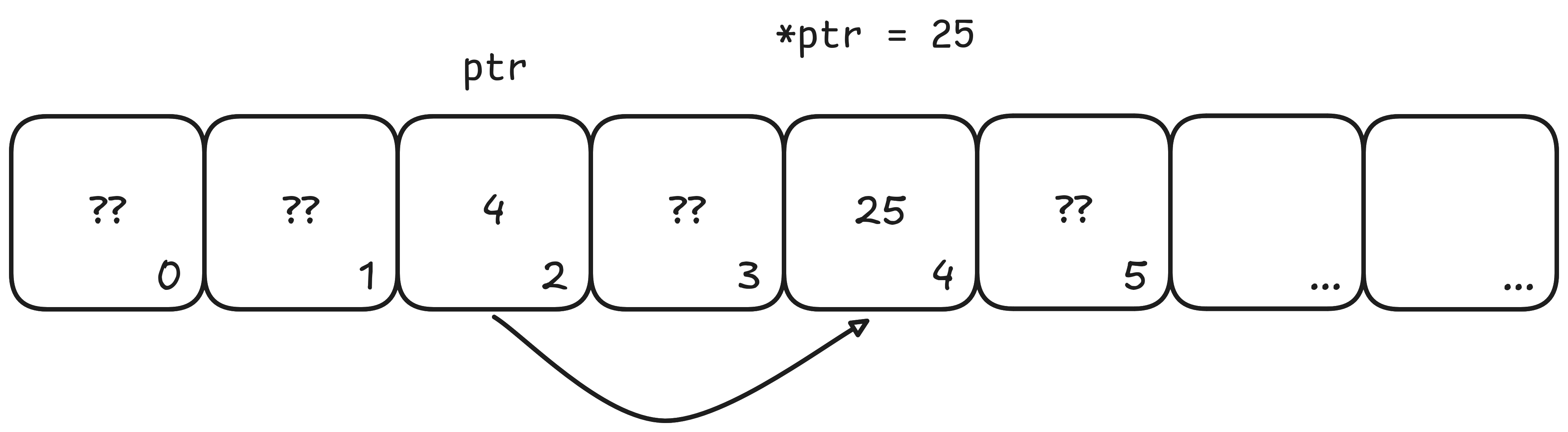
So say… hypothetically, ptr = 4, and we want to say “go to the address and set it to ” (more on how to do this in C later), our computer memory will look like this:

So the whole idea of “Go to this address and read something from it or write something to it” is basically what pointers is all about. The whole writeup here, is pretty much about how we can do this in C, different important aspects about it, and finally why we do it.
Now very importantly, every object we are working with has an address. Every integer you make, every double, every char. They all have addresses. Every byte in computer memory has an address. Think about it this way, if the CPU needs to read/write to a part of RAM, it actually needs to go to that location to do something about it. Therefore it must have an address.
Okay in all the subsequent sections there are many many mini programs you’ll need to code out and run. It’ll be accompanied with explanations and demos.
Whereever you see the following block, is where you’ll need to write something small for hands-on experience.
Hands-On Exercises
Here is an example of one such box.
The Syntax in C for Pointers, and Pointer Types
Okay, for you to write any code in C dealing with pointers, you first need to learn how to make pointers and use them specifically in C. So let’s start with syntax.
Getting an Address in C
We just mentioned that the objects we are working with have addresses. So let’s see how to get it. We’ll use a new operator, the ’&’.
Let’s say we declared an integer int x;. This is a variable, so it has an address. How do we print out the address?
#include <stdio.h>

int main(void) {
    int x;
    printf("%p\n", (void *)&x);
}We want you to take special note of what &x is doing here. It’s passing the address of x, not the value of x to the printf function.
The (void *) converts the address to the pointer type that %p expects.
And we want printf to treat this passed in value as a pointer (not an integer). printf will then do so, and print out the address on the screen for us.
In the playground below, variable
yshould be declared and defined for you already. Go ahead and do two things for us:
- Print out the value of
yas the first line of output- Print out the address of
yas the second line of outputClick Run and see what happens.
#include <stdio.h>

int main(void) {
    int y = 10;
    // Your code here
}We can’t predict in advance what the address of your program will be, but here was ours:
10
0x7ffdbdcd14e4
On the first line, is the value of y. And on the second line, is the address of y. On this platform, it’s in hexadecimal,
and if we converted this to decimal, it should tell us that:
- The variable has value
- The variable lives on address 0x7ffdbdcd14e4, or 140727787787492 (in decimal)
Aside: So we suppose now we know how to get addresses y should be terrified. After all, we know where it lives.
Declaring and Defining Pointers in C
Okay but printing out an address is not all that we can do. Remember, we want our C programs to go to addresses to do things, not just print them out. (Printing them out is useful for debugging stuff, but there’s so much more we can do).
So now let’s see how we can, given some variable x:
- Compute its address
- Store it in another variable
x_ptr
We could write the following in C code:
int x;
int *x_ptr;
x_ptr = &x;
Or if you want things to be a little bit shorter:
int x;
int *x_ptr = &x;
Here, we’re declaring a variable x_ptr. Remember how all our variables have types? Like how x here has type int? Our pointer here x_ptr has type int *. You can read this to mean: Pointer to an integer. Very importantly, the value of x_ptr is the address of x.
In the playground below, variable
zshould be declared and defined for you already. Go ahead and do a few things for us:
- Make a pointer (call it whatever you want). We need you to set the value of the pointer you made, to the address of
z- Print out on the first line, the address of
z- Print out on the second line, the value of the pointer you made
To print it out, you’ll need to use %p with
printf, as before.Click Run and see what happens.
Run it and take note of the values. Are they the same? Are they different? (If you did everything right, it should be the same, and you successfully stored the address of
zsomewhere, yay!)
#include <stdio.h>

int main(void) {
    int z = 5;
    // Your code here
}So what you would have just done, is declaring and defining pointers. So if you got that, try the next one:
In the playground below, variable
ashould be declared and defined for you already. Go ahead and do a few things for us:
- Make a pointer (call it whatever you want). We need you to set the value of the pointer you made, to the address of
a- Print out on the first line, the value of the pointer you made
Take special note here that the variable
ais this time around of typedouble. How should your declare your pointer now? What type should it be?Click Run and see what happens.
#include <stdio.h>

int main(void) {
    double a = 5;
    // Your code here
}Dereferencing Pointers
Now that we can make pointers (which are variables that store addresses). Let’s try reading or writing from those addresses.
To do so, we need &’s cousin: *. * is called the dereference operator.
We place it before a pointer expression, such as *ptr or *(ptr + 1).
While & gets the address of an object, * accesses the object at the address given by the pointer expression.
So for example, say we had int x = 5; and a pointer int *p = &x;.
To read the integer at the address stored in p, we would use *p.
The pointer must refer to a valid object that is still alive before we dereference it.
#include <stdio.h>

int main(void) {
    int x = 5;
    int *x_ptr = &x;
    printf("%d\n", x);
    printf("%d\n", *x_ptr);
}On the first line inside main, we’ve made an integer. On the second line, we made a pointer, whose value is the address of x.
On the third line, we’re printing the value of x. And now take special notice of the 4th line. We are going to the address
pointed at by x_ptr, and reading from it.
Since x_ptr stores the address of x, it actually means we’re going to where x lives, finding out its value, then printing it.
Very roundabout way to do this. You’ll see where this is useful later.
In the playground below, variables
xandx_ptrshould be declared and defined for you already. Go ahead and do a few things for us:
- Print out the value of
xon the first line- Print out the result you get from dereferencing
x_ptron the second lineClick Run and see what happens.
#include <stdio.h>

int main(void) {
    int x = 5;
    int *x_ptr = &x;
    // Your code here
}Really, every time you see *ptr, you should think of this as accessing the object at the address stored in ptr.
Reading Values
Okay, so to read values, we can do this:
#include <stdio.h>

int main(void) {
    int x = 5;
    int *x_ptr = &x;
    int y = *x_ptr;
    printf("%d\n", y);
}The third line inside main will set to y whatever value was pointed at by pointer x_ptr, which happens to be
the value of x, which is 5.
Writing Values
Similarly, to write values, we can do this:
#include <stdio.h>

int main(void) {
    int x = 5;
    int *x_ptr = &x;
    *x_ptr = 10;
    printf("%d\n", x);
}The third line inside main will set to 10 whatever value was pointed at by pointer x_ptr. x_ptr was storing the
address of variable x. Which actually means we’re going to where x lives, and telling it it now has the value .

If you want some pictorial intuition:
Pointers vs Arrays, Sizes, and Array Decay
Now strap in a little, because here’s where the confusion begins for most. We’re sorry to say that C chose to do things this way, and whilst it was not meant to confuse people, newcomers are inherently confused anyway. Let’s try to fix that.
We’ve been talking about arrays before this and things were probably fine and dandy. So to delare a fixed-size array, we could do something like:
int main(void){
    int array[10];
}
What’s the size of this array? Well it’s the size of 10 integers! Makes sense so far.
We also said that to pass arrays into functions, we could write something like the following:
void take_array(int arr[]){
    // arr points to the first element of the caller's array
}
Now, if you remember the whole hoo ha we had about pass-by-value, we might interpret this to mean that in the following snippet,
array_1 and array_2 are different copies.
void take_array(int array_2[]){
    // array_2 points to the first element of {1, 2, 3}
    array_2[0] = 0;
    // the caller's array now contains {0, 2, 3}
}

void make_array(){
    int array_1[3] = {1, 2, 3};
    take_array(array_1);
    // after calling take_array(), array_1 is expected to be unchanged
    // but in fact, array_1 is also changed.
}
However, C does something silently here: the array expression array_1 converts to a pointer to its first element
when we pass it to take_array(). We call this array-to-pointer decay.
Separately, the parameter declaration int array_2[] is adjusted to int *array_2.
The function receives a copy of that pointer value, not a copy of the array.
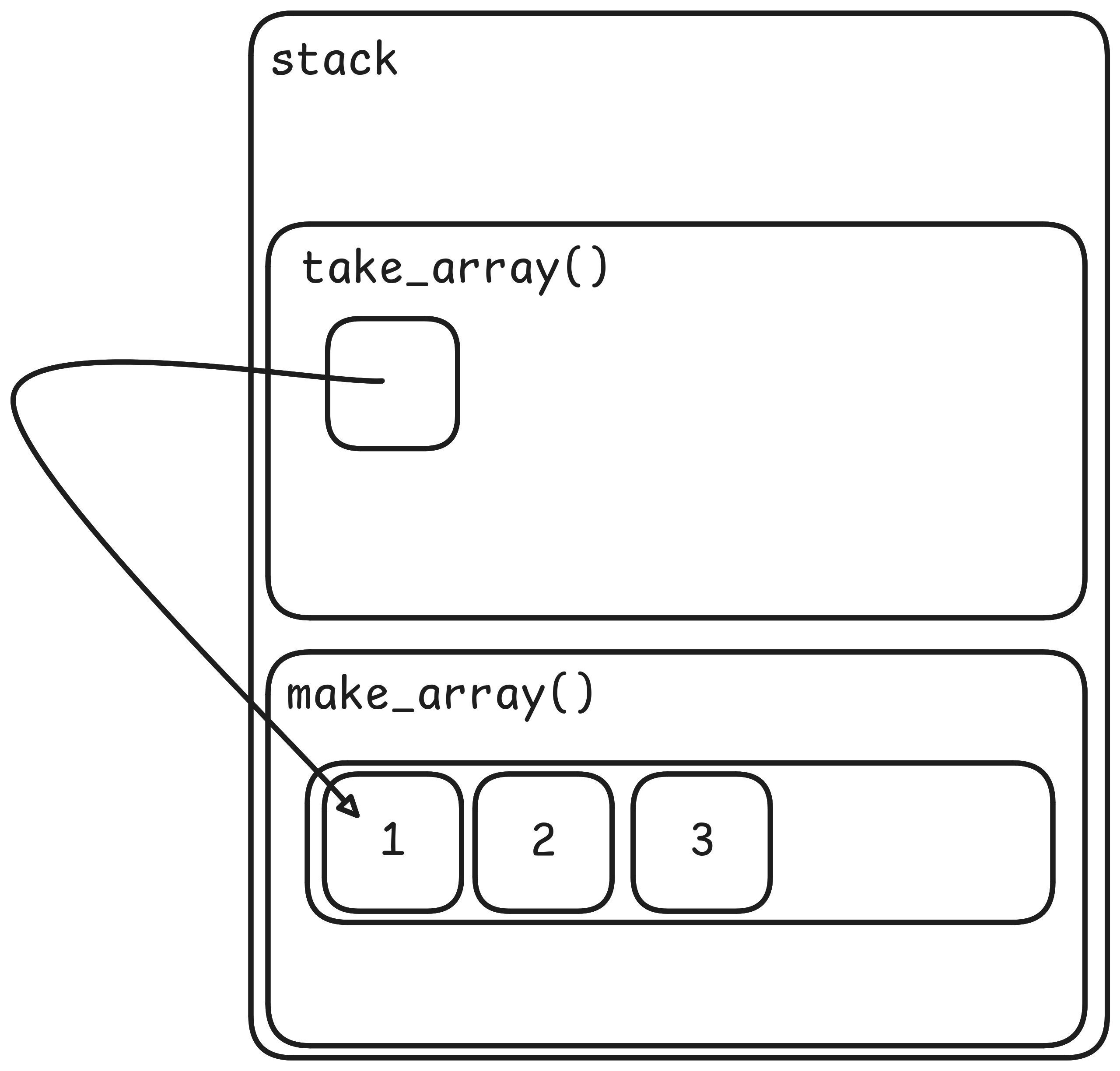
Crucially, this means that in take_array, it actually points to the original array, instead of a copy.
So we will be changing the original.
Importantly, this also means that we actually don’t know what the size of the array is from the perspective of take_array() because
all it has is a pointer.
In fact, try the next exercise to see what we mean.
In the playground below, you should be able to see in the main function two lines printing the size of an integer, and the size of the array. Then, it calls the
print_sizefunction, which is initially empty.Write in the function
print_size, a single line that prints the size ofarr. You can refer to main to see how we usedsizeof.Click Run and see what happens. Also note any compiler warnings that happen while you do so. Those might be interesting to give a read.
#include <stdio.h>

void print_size(int arr[]) {
    // Your code here
}

int main(void) {
    int arr[10];
    printf("%zu\n", sizeof(int));
    printf("%zu\n", sizeof(arr));
    print_size(arr);
}To really show you that arrays decay to pointers. Let’s try one more idea. Let’s look at the following snippet:
#include <stdio.h>

int main(void) {
    char str[] = "hello";
    printf("%s\n", str);
}We now know that when we call printf, we’re passing in the address of the first character of the string. Which means it’ll start reading the string from that address. It’ll see the letter ‘h’, then try the next address, see a letter ‘e’, rinse and repeat and eventually it’ll hit ‘o’ and then finally the null terminating character for strings: ‘\0’.
What if we wanted to program to print “ello” instead? Is there a way for us to do this without creating yet another string?
In the playground below, you should be able to see this snippet of code. Below it we just want you to call
printfagain, but somehow make use ofstrto make it print"ello".Click Run and see what happens.
#include <stdio.h>

int main(void) {
    char str[] = "hello";
    printf("%s\n", str);
    // Your code here
}Pointer Types
We did something interesting earlier that we want to now explain: If we wanted to make a pointer to an integer, we knew we needed type int *.
Similarly, if we wanted to make a pointer to a double, we hope you figured it out, we needed type double *.
Since they’re all just addresses, why do we need to store what type it is? We’re glad you rhetorically asked, Eldon!
There are two important reasons for this:
- We need to know what type we will be getting back after we dereference the pointer
- When pointers are used to represent arrays, we need to know how many bytes to skip over
Let’s do an example between arrays of integers vs. arrays of characters.
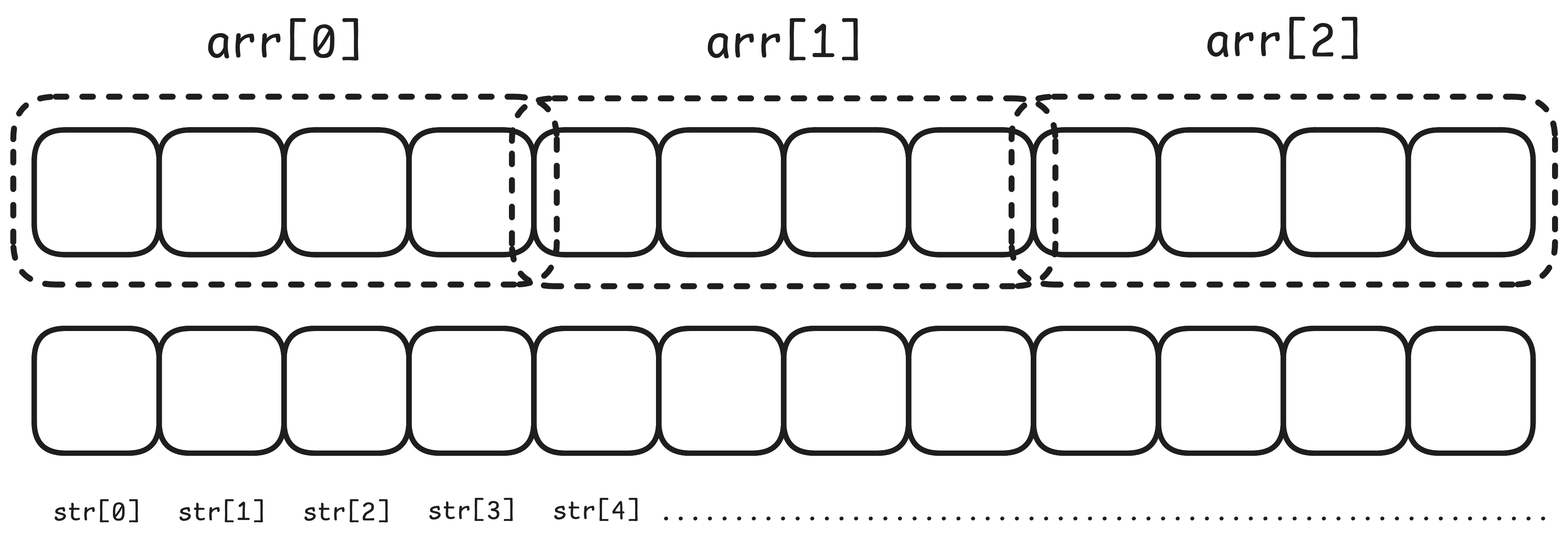
So let’s assume integers are 4 bytes large for now. If we had an array of 3 integers, that’s actually 12 bytes large. And they’re all next to each other.
If the first integer has numeric byte address , then the second has numeric byte address , and the third has numeric byte address . These are calculations on numeric byte addresses, not C pointer arithmetic. If int *p points to the first integer, p + 1 points to the second and p + 2 points to the third. Adding 1 to p advances by one integer, which is 4 bytes under our assumption.
In the playground below, you should be able to see in the main function two lines printing the address of the first element and second element of
arr.Write in the
main, two lines printing the address of the first element and second element ofstr. Remember how to obtain addresses! Use the & operator.Click Run and see what happens. On this platform, the addresses are printed out in base-16; the format of
%pis implementation-defined. That means instead of 0, 1, 2, 3, …, 9, 10, 11, 12, 13,… Each digit has 16 values, 0 to F. Where A is 10, B is 11, C is 12, D is 13, E is 14, and F is 15.So for example, C + 4 = 10 in base 16. In base 10, we know this as 12 + 4 = 16.
Take note of what you see here, and notice the difference between the addresses.
#include <stdio.h>

int main(void) {
    int arr[3];
    char str[12];
    printf("%p\n", (void *)&arr[0]);
    printf("%p\n", (void *)&arr[1]);
    // Your code here
}Something to Note
We don’t know if you have noticed by now but when a function takes a pointer, it doesn’t actually mean it’s an array. It could really be a pointer to a single integer. Try the following exercise.
In the playground below, you should be able to see an integer
a, and an unimplemented functionchange, which takes in a pointer to an integer.You need to do two things: In
change, you need to add to the integer pointed at byptr. Remember, use the dereference operator *. Inmain, you need to callchange, and remember, don’t pass in the integera. You need to pass in the address ofa. Use the & operator.Click Run and see what happens. Ideally, it prints .
#include <stdio.h>

void change(int *ptr) {
    // Your code here
}

int main(void) {
    int a = 5;
    // Your code here
    printf("%d\n", a);
}So important takeaway: A pointer could either point to a single integer, or an element of an array. The programming language does not distinguish between the two, the programmer has to make it clear from context.
For example, strings are null-terminated sequences of characters stored in arrays. A function like strlen() which we’re hoping you’re familiar with by now
takes in an address to the first character of the string, and treats it as an array of characters. Not as a pointer to a single character.
Pointers to Structs
Speaking of pointers to things, let’s try playing with pointers to structs also. Recall we use the dot operator (.) to access members of structs.
That’s when you have the struct itself. But what about when you have a pointer to the struct? Then you’d need to dereference the pointer first
before using the dot operator. So something like (*ptr).x would access the member named x.
There’s also a slightly neater way which is less cumbersome, which is to use the arrow operator (->). So instead, you can do ptr->x
which achieve the same effect.
In the playground below, you should be able to see a
Pairnameda, and unimplemented functionstake_by_ptrandtake_by_value. The former takes a pointer tostruct Pair, and the latter takes a the struct itself.In both functions, we want you to set the
xmember of the struct to , and theymember of the struct to . Bear in mind that both functions need to do this differently, one uses the dot operator and one uses the arrow operator.In
main(), add the call totake_by_ptr, passing the address ofa.Then when you’re done, read through the code in main, and make your predictions on what the 3 lines of output should be.
Click Run and see what happens. Ideally the first two lines of output are the same, at
5, 10, and the final line is0, 1. Figure out why this is the case.
#include <stdio.h>

struct Pair {
    int x;
    int y;
};

typedef struct Pair Pair;

void take_by_ptr(Pair *ptr) {
    // Your code here
}

void take_by_value(Pair a) {
    // Your code here
}

int main(void) {
    Pair a = {.x = 5, .y = 10};

    printf("Before any function: x = %d, y = %d\n", a.x, a.y);
    take_by_value(a);
    printf("After take by value: x = %d, y = %d\n", a.x, a.y);
    // Your code here
    printf("After take by ptr: x = %d, y = %d\n", a.x, a.y);
}Pointers to Pointers
Remember how we said everything has an address? So what if we made a pointer, and took the address of that?
int main(void){
    int x;
    int *x_ptr = &x; // pointer to x
    int **x_ptr_ptr = &x_ptr; // address of x_ptr
}
Notice here that x_ptr is itself a variable, local to main. It has an address too.
Now that we’ve mentioned this, we want you to look at the following snippet, and figure out why this code (while seemingly similar), doesn’t make sense.
int main(void){
    int x;
    int **x_ptr_ptr = &(&x); // ???
}
This snippet might look similar because we’re just skipping a step and applying & twice. It’s very tempting to think that this is the same as the previous code.
However, &x_ptr was taking the address of a variable, in particular the variable x_ptr itself. Think of it this way:
you’re asking where x_ptr lives. On the other hand, doing something like &(&x) is like asking “where does the address of x live?”.
But &x produces a pointer value, not a variable whose address we can take.
We need a pointer variable such as x_ptr to store that value before taking its address.
Anyway, back to “pointers to pointers”. Let’s use one to change a pointer in the calling function. We will look at arrays of pointers and allocation in Part 2.
In the playground below, you should see an empty function
change. You might notice that the initial value ofptrbefore doing anything is the address ofx. The behaviour ofchangeshould be to set the value ofptrfrommain()to the address ofy, also inmain(). Pass&yas the second argument,new_value, and set*ptrto that value. Both integers stay alive inmain()while we use the pointer. For that reason,changeneeds to take a pointer to a pointer, take special note of the type of the parameter there.Click Run and see what happens.
#include <stdio.h>

void change(int **ptr, int *new_value) {
    // Set the caller's pointer to new_value
    // Your code here
}

int main(void) {
    int x = 5;
    int y = 10;
    int *ptr = &x;
    printf("Before: %d\n", *ptr);
    change(&ptr, &y);
    printf("After: %d\n", *ptr);
}The key takeaway here is that int ** is a pointer to a pointer.
Part 2 will be available after Lecture 6.