| Exercise | Focus |
|---|---|
| 0. FooTube Stats | Accumulating state through functions that take and return a struct. |
| 1. UPC-A Barcode | Abstract barcode patterns, function composition, and state passed through functions. |
| 2. Packet Sniffing | Calling functions to do things that you don’t need to know how to do (abstraction!) |
| 3. Recursion Practice | Recursive control flow and printing values from 0 to n. |
Getting Started
- Don’t know how to get started with a Volume? Refer to the instructions in Tutorial 0
- To understand how the volumes are graded, refer to How Are Volumes Graded
- To read our expectations for code in this course (which we will teach you over time), read C Standards
Warning: You can't use certain C language features for this Volume, sorry :(
In this volume, we’re going to take the rare step of disallowing certain language features. For example, the code you write in
student.cshould not use any of the following (ignore if you have never heard of them):
- Loops
- Arrays
- Global variables
- Pointers
- Dynamic allocation
- Function-local
staticvariablesWhy? Typically, we’re very happy to let you use any parts of C you might know before CS1010, and we hate banning things. We also want our questions to be designed such that the concepts we want to teach are clearly advantageous in solving the question. We did not ban any language features last year and generally the cohort did not pick recursion up as well as opposed to cohorts that were forced to practice recursion without loops.
In this Volume’s case though, we do want you to develop specific skills to help you later (e.g., solving basic recursion questions now without the aid of loops, so that it becomes easier later, or using structs to solve specific types of problems). Working with constraints also helps develop your problem solving mental muscles. Please bear with us for now and trust that limiting some approaches right now is in your best interest.
Recursion is a 100% fundamental and realistic skill that you will need for future algorithms and concepts. While they are not prolific in real life code (often times, yes you will just loop through something), they often show up when it matters most. Quicksort, Binary Search Trees, vEB Trees, Butterfly Networks, Fast Fourier Transforms, etc. All of these are recursive ideas. Recursion is a great tool and choosing to shy away from it right now would be seriously limiting your potential.
Heads Up
Just a heads up: there will be a lot of reading this volume. We want to use this opportunity to give you a glimpse into how real life systems work, so these projects actually have real-life practical implications. When you finish these things, you’ll have completed projects that are quite close to being realistic. In fact: the solutions are actually relatively short!
But yes, there will be a lot of reading.

0. FooTube Stats
Focus
Accumulating state through functions that take and return a struct.
Introduction
It’s your first day at FooTube (an entirely legally distinct company from YouTube in every legally meaningful way, don’t sue us)
FooTube provides a platform where video creators publish videos for viewers around the world, which is incredibly unique and no one has ever done this before.

We are trying to provide our video creators with accurate statistics on the watch times of their videos. Every time a viewer finishes watching a video, the server receives the total watch time of the viewer for that video, rounded to the nearest second. Each input watch time is a non-negative integer.
At regular intervals, FooTube wants to report the:
- shortest and longest watch times
- average watch time (arithmetic mean)
- total number of views
- total watch time
The server could store every watch time and process the complete collection later, but that would use more memory as the number of viewers grows. Instead, it should process each watch time immediately as it arrives and retain only the information needed to produce the report.
Your fellow engineers (who have all quit for some reason, but I promise our company has lots of money left) have implemented most of the system already. It can now read a sequence of watch times in seconds, and passes them to some functions one at a time. You will have to implement these functions to produce the statistics we want.
Your Task
In student.c, you must implement these three functions (and the State struct, which we will describe shortly):
State first_watch(State state, int watch_time);
State next_watch(State state, int watch_time);
void print_stats(State state);first_watchwill be called when the first-ever viewer of a video finishes watching it, and their watch time will be passed to the function aswatch_timenext_watchwill be called with the watch time for every subsequent viewer of the video- When
print_statsis called, you should print out the statistics so far as in the Required Output section.
We promise that first_watch will only be called once at the start during the program, and all subsequent watch times will be provided via next_watch, and print_stats will only be called once at the end of the program. You may assume that the sequence contains only non-negative watch times and that their sum fits in an int.
What’s this State thing?
The starting State struct contains two placeholder fields:
typedef struct State {
    int replace_me_a;
    int replace_me_b;
} State;
Replace these placeholders with the scalar fields needed to remember information between calls of the program. Any basic numerical types like char/int/float/double/long... and bool are all allowed. You can have any number of fields (not just two!)
The first_watch and next_watch functions allow you to return an instance of the State struct. The code that your ex-colleagues wrote for you will pass those values back into the next call to next_watch.
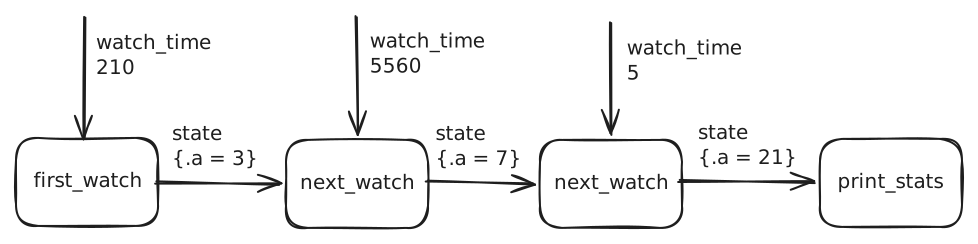
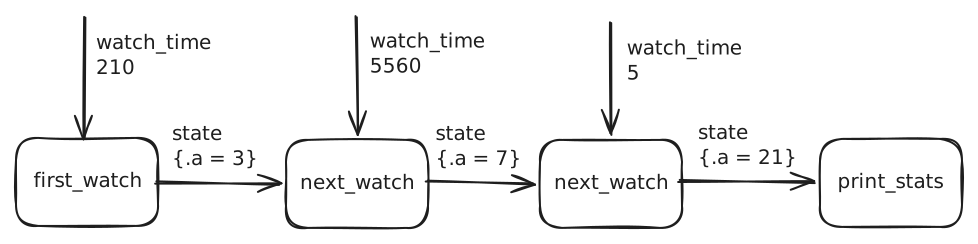
For instance, assume that the watch times for a video are 210 seconds, 5560 seconds, and 5 seconds, and that your struct has only one member (a). Further assume that you returned the state struct with a = 3 for first_watch, and a = 7, and a = 21 for the next two calls to next_watch. Note that this is a completely made up scenario. In this scenario, the sequence of data passed to the functions would be as in the diagram below.
Input
The first input line contains the positive number of watch times. The second line contains that many non-negative integer watch times, separated by spaces.
Required Output
print_stats must print exactly five lines in this order:
min: <minimum>
max: <maximum>
mean: <mean to 5 decimal places>
count: <number of watch times>
sum: <sum>
Running and Testing
- To compile: run
make - To run: run
./stats - To test: run
make test
For example:
Input
5
1 3 2 5 4
Output
min: 1
max: 5
mean: 3.00000
count: 5
sum: 15
1. UPC-A Barcode
Focus
Abstract barcode patterns, function composition, and state passed through functions.
Introduction
You are an engineer at the company Swift Scanning and Fulfilment, also known as SSCANF Solutions. The company generates barcodes for consumer products, and their main selling point is going to be being the fastest in the market at generating barcode images from digit sequences.
Therefore, your task is to help build a program that converts a sequence of digits into a barcode. The program accepts exactly 11 digits as input. For instance, given this 11-digit sequence representing an item:
03400029005
the program should generate a barcode similar to the following image.

Try scanning this barcode!
Using an app on your phone or a website like https://www.barcodestalk.com/free-online-barcode-scanner, try to see what product this refers to :)
Note that there are 12 digits in this image. The extra digit 5 at the end is called the check digit, which has to be computed from the original 11-digit sequence.
Thankfully, other engineers have written the input reading and image generation parts of the program. Your job is to complete the logic that receives the first 11 input digits one at a time, calculates the check digit, and assembles the complete barcode. That is, you need to output the modules that should make up the barcode.
Modules and Patterns
A barcode consists of equal-width “modules”, which are simply white or black vertical bars.
Each module is either white (0) or black (1).
Consecutive black modules appear as a wider bar,
while consecutive white modules appear as a wider space.
A UPC-A barcode contains 95 modules in this order:
start guard | 6 left digits | centre guard | 6 right digits (including check digit) | end guard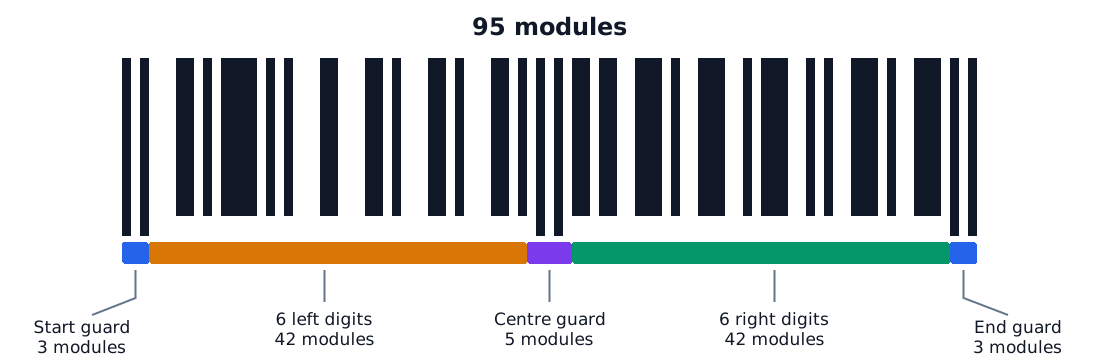
The two groups of six digits are separated by the centre guard.
Guard Patterns
The three guards (start, centre, end) are each represented by a fixed set of modules (also called a pattern). You don’t need to know the exact pattern for each guard.
FYI only: Mapping between guards and patterns
Guard Pattern Start 101Centre 01010End 101You do not have to implement or memorise this mapping. The supplied
start_guard,centre_guard, andend_guardfunctions return the appropriateBarPatternvalues for you.
These help scanners to know where the code starts and stops, and help to locate the exact middle of the code.
Digit Patterns
The digits are the actual data you want to encode into the barcode: 11 data digits and 1 check digit. They are encoded differently depending on whether they are left or right of the centre guard.
The first six digits use “left digit” patterns. The final six digits use “right digit” patterns. These patterns are different, so be careful about whether your digit is left or right of the centre. Note again that the twelfth digit is the check digit that must be calculated by your program.
FYI only: Mapping between digits and patterns
Each decimal digit has one seven-module pattern on the left side and another on the right side.
Digit Left pattern Right pattern 0 000110111100101 001100111001102 001001111011003 011110110000104 010001110111005 011000110011106 010111110100007 011101110001008 011011110010009 00010111110100For every digit, the right pattern swaps the black and white modules in the left pattern.
You do not have to implement or memorise this mapping. The supplied
left_digit_patternandright_digit_patternfunctions return the appropriateBarPatternvalues for you.
Check Digit Calculation
Number the eleven input digits from 1 to 11, starting from the left. Multiply the digits in odd-numbered positions by 3 and the digits in even-numbered positions by 1, then add the results.
If the weighted sum is , the check digit is:
For example, the check digit for 03400029005 is 5,
producing the complete UPC-A digit sequence 034000290055 2.
BarPattern struct and helpers
To represent the patterns (and eventually the barcode as a whole), we have defined a BarPattern struct for you. You should not change it, and you do not need to know anything internal about it (e.g., you don’t need to know its fields, etc).
To construct the patterns that make up the final barcode, you should use only our helper functions here:
// The three functions below return the pattern for the guards
BarPattern start_guard(void);
BarPattern centre_guard(void);
BarPattern end_guard(void);
// The two functions below return a pattern for a left digit or right digit
BarPattern left_digit_pattern(int digit);
BarPattern right_digit_pattern(int digit);
// This function joins patterns together to form a larger pattern
BarPattern join_patterns(BarPattern left, BarPattern right);
A quick example of how we could generate the first two digits of a barcode such as 12xxxxxxxxx (though this code could be improved significantly):
BarPattern start = start_guard();
BarPattern digit1 = left_digit_pattern(1);
BarPattern digit2 = left_digit_pattern(2);
BarPattern joined1 = join_patterns(start, digit1);
BarPattern joined2 = join_patterns(joined1, digit2);
// More code...
In this situation, joined2 now contains the barcode up to the second digit.
Your Task
The setup for your task in this question is almost identical to the 0. FooTube Stats question.
In student.c, define the members of State and implement:
State first_digit(State state, int digit);
State next_digit(State state, int digit);
BarPattern finish_barcode(State state);first_digitwill be called once, when the first digit of the barcode is passed to younext_digitwill be called once for each subsequent digit, up until and including the 11th digitfinish_barcodewill be called once at the end. Return a completeBarPattern(this is one big difference from the earlier question) containing the three guards and all twelve digit patterns, including the calculated check digit
The members of State may be scalar values or BarPattern values.
Input
The program takes an 11-digit sequence representing the data digits for the barcode as input. The sequence may begin with one or more zeroes; these leading zeroes are part of the barcode and must be preserved. If you copy a barcode from online, make sure it’s a UPC-A barcode, and remove the final check digit.
Output
By default, the program decodes the completed BarPattern and prints the complete UPC-A number and all of its modules:
upc: 034000290055
modules: 10100011010111101010001100011010001101000110101010110110011101001110010111001010011101001110101
The upc: line is decoded from the returned pattern. The modules: line prints the same pattern directly. You can check the “FYI” sections above if you need to use the modules line to debug exactly where your code went wrong.
To generate an actual barcode image, run:
make showThe program asks you to enter exactly 11 digits. If the input is not exactly 11 digits, it reports an error. After you enter them, it saves the barcode as barcode.pbm.
Display the image with:
feh barcode.pbmRunning and Testing
- To compile: run
make - To run with an input file: e.g.
./barcode < test/test_cases/barcode-03331719212.in - To test: run
make test
Some barcodes to test with!
0333171921275661900001845973020017358585030274061730856
2. Packet Sniffing
Focus
Calling functions to do things that you don’t need to know how to do (abstraction!)
We’re going to finally cater to the InfoSec people a little (yay, Sriram has been begging me to come up with something for InfoSec).
Let’s read UDP packet headers! For a little context, when your computer sends information over the Internet, it does so in the form of packets. These packets can carry TCP segments or UDP datagrams (no, you don’t need to know what either of those are yet). Programmers pick either of the two depending on their use case. And network security people sometimes sniff them.

To keep things simple, we’re going to try to only read the header portion of a UDP datagram (instead of an entire network packet).
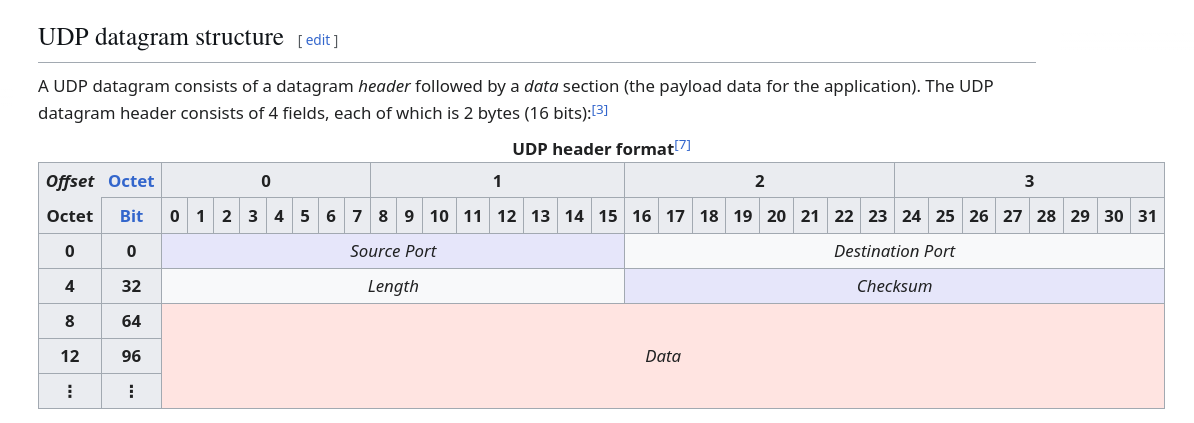
The header simply holds 4 values:
- A source port (you don’t need to know what that is)
- A destination port (you also don’t need to know what that is)
- Length (you also also don’t need to know what that is)
- Checksum (you probably have some idea what this is, but you don’t need to know what that is)
This header (of 4 values) actually comprises 8 bytes of information.
- The first two bytes describe the source port.
- The next two bytes describe the destination port.
- The next two bytes describe the length.
- The final two bytes describe the checksum.
That is to say, all the integers here are 16 bits (2 bytes) wide. Surprise surprise, we’ll be using uint16_t (an unsigned integer of 16 bits) to represent all these values.
However, a bunch of people (much older than you and I) decided at some point that the way values were going to be sent over the network would be via the big-endian system3. Whereas computers (nowadays) generally use little-endian (unless you’re working with IBM Mainframes or Motorola 68K).

Using 32-bit integers as an example for now, 32-bit integers are really 4 bytes. In big-endian byte order, the most significant byte is laid out first, followed by the remaining bytes. In little-endian byte order, the opposite holds true: the least significant byte is laid out first. We’ve linked a picture from Wikipedia to show you the difference.
Feeling confused about bits and bytes?
Read our note on Data Storage in Memory, Bits, and Bytes!
For this exercise, you will be doing a little bit (pun not intended) of byte reversal before our code will turn the bytes back into integers to display on the screen.
In particular, the 8-byte header that we have should really be seen as:
- 2 bytes for source port (in big-endian order)
- 2 bytes for destination port (in big-endian order)
- 2 bytes for length (in big-endian order)
- 2 bytes for checksum (in big-endian order)
How a packet sniffer reads this information is via the following steps:
- Reverse the 0th and 1st bytes.
- Reverse the 2nd and 3rd bytes.
- Reverse the 4th and 5th bytes.
- Reverse the 6th and 7th bytes. (-Ahem-)
Then for each of those pairings of now-reversed bytes, you should convert them back into their integer form by recombining them.
This all sounds scary, but luckily, Cheems the basement dwelling doggo has implemented a swell library that will help you in this process.
These two functions are made available to you (don’t forget to thank Cheems):
void reverse_bytes(bytes_t bytes, size_t from, size_t end);
uint16_t convert_into_uint16_t(bytes_t bytes, size_t position);
Now Cheems has the following message (in lieu of documentation) about the functions:
Woof woof. Henlo. Don’t worry about
bytes_t, it’s just a type that is abstracted away that is the 8 bytes of the packet header.So
bytes_t bytesis an abstracted-away type that is the “raw bytes” of the header.
reverse_bytes takes in the header bytes, and reverses the bytes laid out in positions from (inclusive) to end (exclusive).
Since end is not included, reverse_bytes(bytes, 0, 2) reverses the bytes in positions 0 and 1.
For example, if you called reverse_bytes(bytes, 0, 1), you would have not reversed any bytes. If you called reverse_bytes(bytes, 0, 4) you would basically swap the 0th and 3rd byte. And also swap the 1st and the 2nd byte.
convert_into_uint16_t(bytes, position) takes a position and returns for you the 16-bit unsigned integer based on the byte at position and the following byte. For example, convert_into_uint16_t(bytes, 0) would convert the first two bytes (i.e. the 0th byte and the 1st byte) into a 16 bit integer for you.
These two functions should be helpful in helping you read the packet header data.
Your Task
For your reference, here is the definition of PacketHeader:
typedef struct PacketHeader {
    uint16_t src_port;
    uint16_t dst_port;
    uint16_t length;
    uint16_t checksum;
} PacketHeader;
In student.c, there is a function:
PacketHeader sniff_packet(bytes_t bytes) {
    PacketHeader to_return;
    return to_return;
}
In this function, use the functions provided by Cheems to populate the fields:
src_portdst_portlengthchecksum
with their correct values when given bytes.
You do not have to do any printing. We will do it for you. Just fill in the four fields described above.
Expected Behaviour
The program reads exactly 8 raw bytes from standard input and prints the four decoded header fields:
src port: <source port>
dst port: <destination port>
length: <length>
checksum: <checksum>
Running and Testing
- To compile: run
make - To run with a binary file: run
./sniff < packet.in - To display the bytes in an input file: run
./show-bytes < packet.in - To test: run
make test
Since the test cases are not printable ASCII characters (they are in binary), we included a program called show-bytes so that you can display the contents of the first public test case by running:
./show-bytes < test/test_cases/1.inThe | symbols below visually separate the four two-byte header fields. They are not part of the input file. It displays them in three formats: binary (base-2), decimal (base-10), and hexadecimal (base-16)
Input
binary:  11000011 10100001 | 00000000 00110101 | 00000000 00111011 | 01010010 00110110
decimal: 195      161      | 0        53       | 0        59       | 82       54
hex:     C3       A1       | 00       35       | 00       3B       | 52       36
Output
We will print the output in decimal (base-10) based on the fields you filled in.
Running ./sniff < test/test_cases/1.in should produce:
src port: 50081
dst port: 53
length: 59
checksum: 21046
3. Recursion Practice
Focus
Recursive control flow and printing values from 0 to n.
We’re going to do a small extension (please don’t panic) from the lecture.
Recall in the lecture we wrote a snippet along the lines of:
#include <stdio.h>

void foo(unsigned int n) {
    printf("%u\n", n);
    if (n == 0) {
        return;
    }
    foo(n - 1);
}

int main(void) {
    foo(3);
}
And we showed that this program would print all integer numbers from 3, down to and including 0.
What if we wanted to print numbers from 0 to instead? (I.e. not have them count down, but count up)?
Your Task
In student.c, there is an empty function:
void print_sequentially(unsigned int num) {

}
In this function, write recursive code such that if we called print_sequentially(n), the program should print integer numbers from 0 to (inclusive). Also, recall from the top of this volume that we are restricting the C constructs you can use :)
Remember how to break the problem down! You can even reference the snippet from the lecture, try to understand its behaviour and modify it to get what you need to get.
Expected Behaviour
The program takes just a single integer from 0 to 10000, and should print the numbers from to that input number, inclusive.
Running and Testing
- To compile: run
make - To run: run
./sequential - To test: run
make test
For example:
5The output should be:
0
1
2
3
4
5
Footnotes
-
Sriram wanted to say that he has no idea what percentage of students know the aforementioned “GOJO” (he doesn’t) ↩
-
Can you figure out what product this is? ↩
-
Think this is some obscure stuff? We guarantee you that this comes up in CEG/InfoSec courses many times. Sriram can personally guarantee that concept is in CG2111A. ↩