| Exercise | Focus |
|---|---|
| 0. Iteratively Processing Arrays | Array traversal and processing using loops |
| 1. Linear Regression | Loops over arrays and calculating a best-fit line |
| 2. Load Balancing | Loops and arrays through a load-balancing simulation |
| 3. Two Zero Four Eight | Two-dimensional arrays and decomposition through a game |
Getting Started
- Don’t know how to get started with a Volume? Refer to the instructions in Tutorial 0
- To understand how the volumes are graded, refer to How Are Volumes Graded
- To read our expectations for code in this course (which we will teach you over time), read C Standards
Use Loops for This Volume
This volume’s intention is to help you practice loops. The code you write in
student.c, including any helper functions, must not use recursion.
0. Iteratively Processing Arrays
Focus
Using loops to initialise, transform, and inspect arrays.
Your Task
Remember Recursively Processing Arrays in Volume 3?
This time, implement the same nine functions in student.c using loops instead of recursion.
You may write helper functions, but neither the functions nor their helpers should use recursion.
void initialize_increasing(int values[], size_t length);
void double_if_even(int values[], size_t length);
bool are_all_odd_indices_positive(int values[], size_t length);
int sum_elements(int values[], size_t length);
size_t find_min_index(int values[], size_t length);
int find_max(int values[], size_t length);
double digits_to_double(int values[], size_t length);
void swap_adjacent_pairs(int values[], size_t length);
bool is_palindrome(int values[], size_t length);
The expected results and input constraints are unchanged from Volume 3. Refer to that exercise for each function’s behaviour, examples, and empty-array cases.
Running and Testing
- To compile: run
make - To run: run
./iterative-arrays - To test: run
make test
The input format and operation names are the same as in Volume 3. The supplied program handles input and printing for you. For example, enter:
swap-pairs 5 1 2 3 4 5The program should print:
2 1 4 3 5To test one function at a time, use its C function name:
make test FUNCTION=swap_adjacent_pairsAll nine functions must compile even when you select only one function’s tests.
1. Linear Regression
Focus
Loops over arrays and calculating a best-fit line.
Introduction
The previous exercise had a lot of small functions, but this time, you’re going to build something pretty complete!
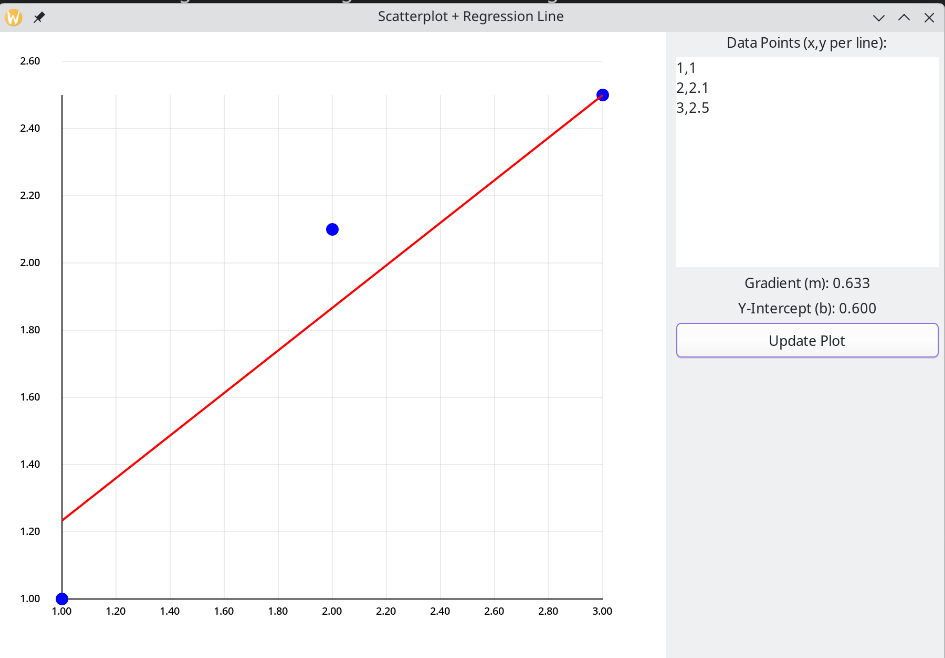
Your goal is to compute a best-fit line using linear-regression, given a number of (x, y) data points as input. We’ve provided a visualizer for you to see and test the effects of your work. At the start, it’s not going to correctly compute the best-fit line, so you have to fix that.
More formally, linear regression finds a line that best fits a collection of data points, by minimising the sum of squared vertical distances from the points to the line.
Here’s what the visualizer looks like. You enter data points in the top right box, and press Update Plot. This will call the function you need to implement, with the data points you write as input. If all goes well, a nice best-fit line will appear :)
Your Task
Implement this function in student.c:
LineParameters compute_regression(double x_values[], double y_values[],
                                  size_t num_values);
Return the result using this struct:
typedef struct LineParameters {
    double gradient;
    double y_intercept;
} LineParameters;
The arrays contain num_values points: point has the th data point, with coordinates x_values[i] and y_values[i] representing the x, y coordinates.
Use loops (not recursion) to process the arrays without changing their contents.
You may write helper functions in student.c.
The input contains at most 1,000 points.
Both coordinates are integers from to , stored as double values.
We will validate the input and pass it to you: you do not need to do so in your functions.
Computing the Line
Given data points , the best-fit line has gradient
and y-intercept
Hint: Not repeating yourself
Look at these equations carefully and consider if there’s a way you can minimize the amount of computation you do (i.e., compute certain terms only once and reuse them where needed).
Return both values in a LineParameters struct.
Also, handle these special cases before using the formulas:
- If
num_valuesis zero, return0.0for both values - Otherwise, if all x-coordinates are equal, there is no unique best-fit gradient. We’re going to just return a horizontal line through the mean y-coordinate.
- Therefore: return a gradient of
0.0and a y-intercept of(sum of all y coordinates) / num_values.
- Therefore: return a gradient of
Running and Testing
- To compile: run
make - To run the visualiser: run
./regression - To test: run
make test
In the visualiser, enter one x,y pair per line, for example:
1,3
2,5
3,7
These points lie on , so the gradient should be 2.0
and the y-intercept should be 1.0.
Click Update Plot to see the result.
2. Load Balancing
Focus
Nested loops and arrays through a simple load-balancing simulation.
Introduction
Here’s the scenario: we have a bunch of servers, each serving some clients.
Some servers have many clients, while others have barely any.
The array arr records the number of clients on each server:
arr[0] is the number on the first server, and so on.
A server is underutilised if it has strictly fewer than 300 clients. For example, in , only the last server is underutilised.
Your Task
Implement rebalance to leave every server with at least 300 clients, if possible:
- If redistribution is impossible, call
print_impossible()and return without making any exchanges - Otherwise, call
exchangefor each transfer needed. If every server already has at least 300 clients, no exchanges are needed
There are between 1 and 256 servers.
Client counts are nonnegative integers, and their total fits in an unsigned long.
Each exchange must move a positive number of clients, no more than the source server currently has, to a different server. The amount in one call must fit in an int.
Code Details
In student.c, you’re given 4 functions:
void debug_print_arr(unsigned long arr[], size_t num_elements);
void print_impossible();
void exchange(int amount, size_t from, size_t to, unsigned long arr[]);
void rebalance(unsigned long arr[], size_t num_elements);
Implement only rebalance; the other three functions are supplied helpers.
exchange(amount, from, to, arr) prints the transfer and updates both array elements for you.
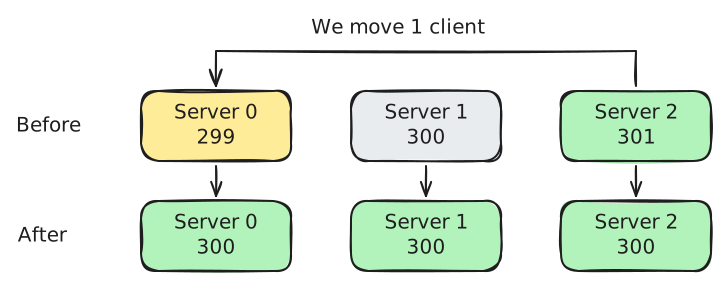
For example, with arr containing {299, 300, 301}, calling:
exchange(1, 2, 0, arr);prints moved 1 from server 2 to server 0 and changes arr to {300, 300, 300}.
debug_print_arr prints the array to standard error (stderr),
so you can inspect it without changing the output checked by the verifier.
Note
You do not need to excessively minimise the number of exchanges. However, we will only allow your program to run for up to five seconds (your
make testsystem will enforce this). Any legal sequence that leaves every server with at least 300 clients is acceptable within the test limits.
Running and Testing
- To compile: run
make - To run: run
./balancing - To test: run
make test
Enter the number of servers on the first line and their client counts on the second. For example:
3
299 300 301
To add your own test case, place a .in file in test/test_cases using this format.
You do not need a .out file: make test uses a verifier to check your redistribution.
3. Two Zero Four Eight
Focus
Two-dimensional arrays and decomposition through a game.
Introduction
In this exercise, you’re going to build an actual game :D! The game in question is the popular single-player sliding block puzzle game 2048. When you finish, you should be able to play it within WebTop. Here’s what it looks like:
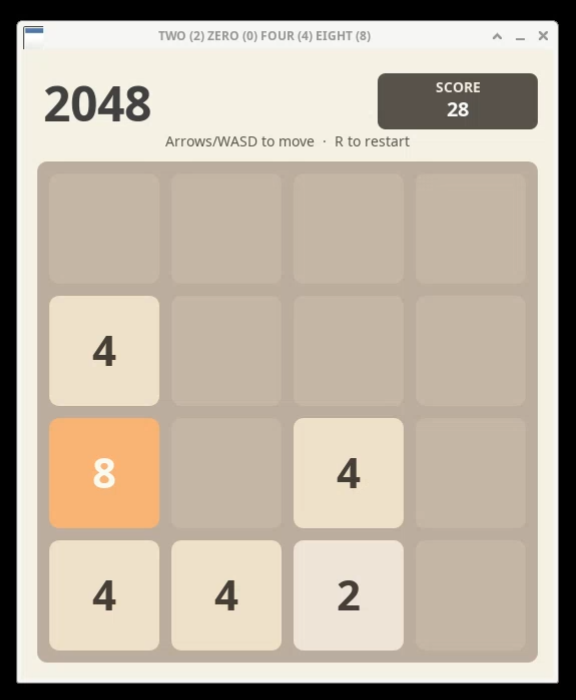
We have provided the graphics, input handling, and overall game structure. Your task is to update the board when the player moves the tiles.
Your Task
Implement these four functions in student.c.
Each function performs one complete move in its named direction:
int handle_move_left(int board[GRID_SIZE][GRID_SIZE]);
int handle_move_right(int board[GRID_SIZE][GRID_SIZE]);
int handle_move_up(int board[GRID_SIZE][GRID_SIZE]);
int handle_move_down(int board[GRID_SIZE][GRID_SIZE]);
The game passes you its current board as a array (GRID_SIZE is 4).
A 0 represents an empty cell; other cells contain powers of two from 2 to 1024.
Update the array directly to show the board after sliding and merging tiles in the chosen direction.
Return the score gained, or -1 if the move changes nothing.
We handle input, drawing the board, and adding random tiles. Your functions should only update the board and return the move result.
How is GRID_SIZE defined to be the value
4?In
gamecommon.h, GRID_SIZE is defined with this line of code:
#define GRID_SIZE 4 // 4x4 grid#defineis known as a preprocessor directive. Before the C code is compiled, the preprocessor (which does stuff before actually compiling the code) replaces each use of the tokenGRID_SIZEwith4.
What a Move Does
Let’s consider moving one row to the left.
First, close the gaps. Move the nonzero values towards the left edge without changing their order:
[2, 0, 2, 4] → [2, 2, 4, 0]Next, merge equal neighbours. Work from the left edge. Combine each equal pair into one tile with twice its value. A tile formed by a merge cannot merge again during this move:
[2, 2, 4, 0] → [4, 4, 0, 0]This is the final row. The two 4 tiles do not merge again.
Close any gaps left by merging. For example:
[2, 2, 4, 4] → [4, 8, 0, 0]A left or right move processes each row independently. An up or down move processes each column independently. Always start merging at the edge towards which the tiles are moving. For example, when moving right, the rightmost pair merges first:
[0, 2, 2, 2] → [0, 0, 2, 4]Return Value
The score gained is the sum of the values of the tiles created by merging.
For example, merging two 2 tiles adds 4 to the score.
Sliding without merging adds nothing.
| Row Before a Left Move | Row Afterwards | Score Gained |
|---|---|---|
[0, 2, 0, 4] | [2, 4, 0, 0] | 0 |
[2, 2, 4, 0] | [4, 4, 0, 0] | 4 |
[2, 2, 4, 4] | [4, 8, 0, 0] | 12 |
[2, 4, 0, 0] | [2, 4, 0, 0] | 0 (unchanged) |
For the whole board, return the total score gained across all rows or columns.
Return 0 if tiles moved but none merged.
Return -1 only if the entire board is unchanged.
For example, handle_move_left should make this change and return 36:
Before                  After
[4, 4, 4, 4]            [8, 8, 0, 0]
[2, 2, 4, 4]            [4, 8, 0, 0]
[2, 0, 2, 2]            [4, 2, 0, 0]
[2, 0, 0, 2]            [4, 0, 0, 0]
The rows contribute 16, 12, 4, and 4 to the score respectively. The board shown is the result your function should produce, before the game adds a random tile.
Breaking the Problem Down
You may write helper functions in student.c.
Think about how to solve one row first, then how to apply that logic to the board.
The four directions have very similar rules.
Could you rearrange the board so that the same helper handles more than one direction?
Remember to restore its orientation afterwards.
Running and Testing
- To compile: run
make - To play: run
./twozerofoureight - To test: run
make test
make test checks both the updated board and the returned score without opening the game window.
To test one direction, use, for example:
make test FUNCTION=handle_move_leftReplace handle_move_left with any of the four handler names.
All four functions must compile even when testing only one direction.
The test cases are a starting point; also test boundary cases of your own.
Playing the Game
The game starts with two randomly placed tiles.
After each move that changes the board, it adds a tile to a random empty cell:
a 2 with 90% probability, or a 4 with 10% probability.
You win when you create a 2048 tile, and lose when no moves remain.
Use the arrow keys or w, a, s, and d to move the tiles.
Press r to reset and q to quit.
Try playing to see if your implementation behaves as expected.
Are there any edge cases that might break your code?
Legend has it that if you manage to create a tile with the value 2048, something special happens. Try it out and see for yourself!